
Apple HomeView without an iPhone nearby can still provide the documented shared functions in an established home. Access to personal content depends on recognition and the paired iPhone or iPad’s connection and unlocked state. Some media apps also require a compatible iPhone nearby, so check the task you intend to use.
On this page
- HomeView without an iPhone nearby by task
- Nearby is not the only condition
- A paired iPad can change the household question
- Visitors do not need the owner’s personal experience
- Media app dependence must be checked service by service
- Use a task test rather than a distance test
- Leaving the room is different from leaving the network
- A phone condition is not an offline capability statement
- Build a useful record when personal content does not appear
- Decide whether phone dependence changes the purchase
Picture a common morning: one person has left for work, another is using the kitchen display. The useful question is whether that second person wants a timer or the absent person’s private information. Those are different expectations.
HomeView without an iPhone nearby by task
| Task | What to check | Useful distinction |
|---|---|---|
| Shared timers or common controls | Documented shared use in an established home | A personal profile is not the same as a shared task |
| Personal messages or calendar content | Recognition and paired device conditions | Successful enrollment does not remove daily access conditions |
| Siri using personal context | Eligible paired device and Siri settings | General questions and private context are different |
| A third party media service | The exact service and nearby device requirement | Generic media support does not settle every app |
| Camera viewing or summaries | The exact camera feature and service prerequisites | Viewing and intelligent interpretation are separate |
Nearby is not the only condition
For personal content, Apple’s product wording includes facial recognition and a paired device on the same Wi-Fi network that was recently unlocked. A phone sitting in the room is therefore not the whole check. The state of that phone matters too.
The announcement also describes a qualified exception when a paired device leaves Wi-Fi. It includes conditions concerning recent network presence, location, cellular connectivity and unlocking. Do not simplify it into a promise that personal content always works after the phone disconnects.
Read the personal content footnote for that exception. The mixed household guide explains why common screen use and access to private information should remain separate.
A paired iPad can change the household question
The product requirements allow a qualifying iPad as well as an iPhone. A household should therefore ask about its actual paired device. The word phone can hide a setup that depends on a tablet instead.
An iPad that stays home might fit some routines better than a phone that travels. It still needs to meet the relevant software and feature conditions. Do not assume that being permanently at home removes every recognition or unlocking requirement.
Check device eligibility by feature before arranging the household around a tablet. A useful plan records both eligibility and when that device is available.
Visitors do not need the owner’s personal experience
A visitor might only want a light control or common timer. Apple’s product FAQ describes shared functions for guests and unrecognized people. That is a different access path from an enrolled person’s personal information.
Do not tell an Android visitor to buy an iPhone merely because a private Siri function has a phone requirement. First check whether their actual task is shared. Equally, do not promise them a private profile because shared interaction is possible.
The mixed household guide helps separate these needs. It also explains why a guest at the screen is not automatically the Home app’s invited Guest role.
Media app dependence must be checked service by service
The ability to play audio does not establish that every audio service works independently of a phone. A service may have its own app support, subscription or device conditions. Check the service you actually use.
For a kitchen purchase, make a list of the media tasks you expect. Include the service, whether another device will remain home and whether someone else should control playback. This turns an unclear independence question into a small set of verifiable checks.
The published app list distinguishes built in apps from apps available from iPhone. Safari or broad third party support should not be treated as a blanket answer for a particular service.
Use a task test rather than a distance test
To assess Apple HomeView without an iPhone nearby, write the expected action first. Then identify the supporting device and required state. Finally record the documentation that establishes the behavior.
- Choose one task, such as a common timer or a personal calendar request.
- Identify whether it uses shared information or a resident’s private information.
- Record the paired device and the software or service prerequisites.
- Check the recognition and connectivity conditions attached to that task.
- Leave untested behavior marked unknown rather than inventing a distance limit.
We have not measured a recognition range, an unlock timeout or an offline grace period. Those values cannot be derived from general product wording. An actual device test must record the software and exact task.
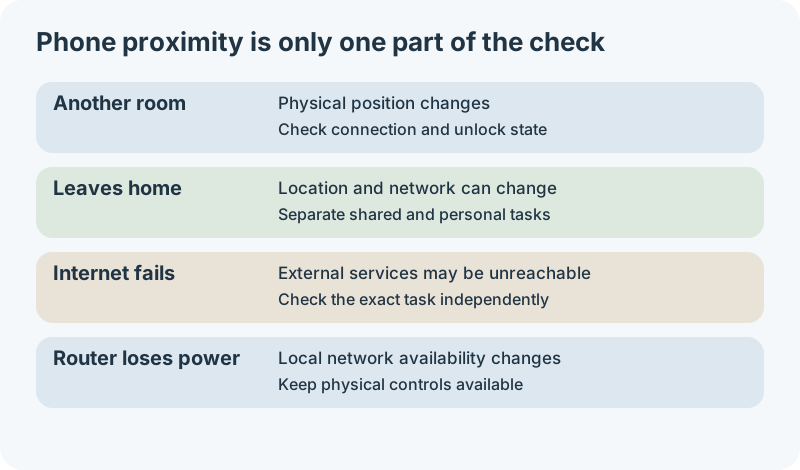
Read the diagram
- Another room: check connection and unlocked state for the personal task.
- Leaves home: distinguish common tasks from the departing person’s private tasks.
- Internet fails: investigate the exact service separately from phone proximity.
- Router loses power: local network availability changes; retain physical controls.
Leaving the room is different from leaving the network
The published personal content conditions refer to recognition, the paired device’s network and its recent unlocked state. They do not define a measured room boundary. Moving a phone upstairs is therefore a different scenario from taking it out of the home.
A phone can be physically close while disconnected from the expected network. It can also be farther away within the home while remaining connected. Neither observation alone proves that a personal request will succeed.
For a purchase decision, record the state you care about rather than a guessed distance. Examples include a phone charging in another room, a paired iPad at home, or a resident leaving for work. Then check the conditions attached to the exact task.
The cellular exception is a conditional case
The announcement’s exception concerns a paired device that has disconnected from Wi-Fi. It requires recent presence on the same network, an active cellular connection, the same location and a recent unlock. Facial recognition is still required.
That wording should not be expanded into an away from home guarantee. A phone traveling with its owner to an office does not meet a simple interpretation of remaining at the same location. The source does not publish a distance or timeout that would justify a broader promise.
Do not treat an iPad without cellular service as qualifying for the cellular exception. It may still fit the ordinary connected scenario if its other conditions are met. Check the actual paired device rather than substituting the capabilities of a different model.
A phone condition is not an offline capability statement
Using a screen without a phone beside it and using it without internet are separate questions. A functioning home network does not establish that a cloud service is reachable. A powered screen does not establish that every feature works during a network outage.
| Situation | What has changed | What to investigate |
|---|---|---|
| Phone in another room | Physical position | Recognition, connection and device state for the personal task |
| Phone leaves the home | Location and often network connection | Which functions are shared and which depend on that person’s device |
| Internet connection fails | Reachability of external services | The particular app or service’s behavior, separately from phone proximity |
| Router loses power | Local network availability | The device connection path and remaining physical controls |
| HomeView loses power | The display is no longer powered | Alternative household controls rather than a phone workaround |
The table separates situations that are often described simply as offline. It does not assign untested results to them. Use the compatibility guides to review the people and equipment involved in the task.
Build a useful record when personal content does not appear
When hardware is available, start with the requested action and the observed response. Record whether a shared task works at the same time. A private request failing while a common timer works narrows the issue more than saying that Apple HomeView is broken.
Then record which person is recognized and which device is paired for that person. Confirm the relevant operating system and settings. Check the paired device’s connection and whether it was recently unlocked, without inventing a required unlock interval.
If the problem concerns media, identify the exact app and account. A nearby device requirement for one supported app should not become a conclusion about every media function. Keep the app’s error or prompt with the record.
A short troubleshooting record should contain no passwords, private message text or camera footage. Note the state and error instead of exposing personal content. It gives support a clearer starting point and makes later comparisons more useful.
A test plan for the main household routine
- Choose one shared task and one personal task that matter to the household.
- Record the baseline with the paired device connected and available.
- Change only one condition, such as moving the device to another room.
- Record recognition, connection state, prompts and whether the requested action completes.
- Repeat the comparison before treating a single result as reliable behavior.
This is a proposed method for future testing, not a report of tests we performed. Keep software versions with the observations because behavior can change. A baseline and one changed condition are more informative than several simultaneous changes.
Before buying, the method also helps identify the evidence you still need. If the routine only matters when the paired device is away, ask for that exact scenario. A demonstration with a phone beside the screen does not answer it.
Decide whether phone dependence changes the purchase
If your main goal is common household controls, a personal phone condition may not affect the routine much. If your main goal is private scheduling, it could be central. Judge the importance of the condition against the task you are buying for.
The requirements checker can organize the prerequisites. It cannot verify a phone’s current network state or predict an untested feature.
HomeView without an iPhone nearby is best treated as a group of task specific answers. Keep shared access, personal content and app support separate. That produces a more reliable decision than assuming either complete independence or complete phone dependence.