
For Apple HomeView tabletop vs wall mounted, choose tabletop when a convenient surface and easy relocation matter most. Choose wall mounted when a fixed control position solves a space or access problem and the power route is practical. Both models share the advertised display size, but their power arrangements and audio hardware differ.
On this page
- HomeView tabletop vs wall mounted at a glance
- Choose tabletop when the task follows a surface
- Choose wall mounted when the location is established
- Do not assume the two models are interchangeable
- Audio is a reason to compare, not to invent a verdict
- Compare complete costs for the same room
- Map each room to an interaction, not just an appearance
- Choose a usable height without inventing one universal measurement
- Trace the power route before committing to a model
- Moving home and changing routines affect the value of each model
- A room test before ordering
A kitchen counter and an entryway can serve very different routines. One may suit a call or recipe; the other may suit a quick control on arrival. The physical model should follow that routine.
HomeView tabletop vs wall mounted at a glance
| Decision | Tabletop route | Wall route |
|---|---|---|
| Placement | A suitable surface near power | A chosen wall position and mounting path |
| Included power equipment | Cable and adapter included | Mount and power solution chosen separately |
| Audio hardware | Additional bass hardware in the base | Drivers in the display |
| Changing location | Check the new surface and outlet | Reassess mounting and cable route |
| Installed budget | Fewer separate installation decisions | Mount, power and possible labor costs |
The audio distinction comes from the published hardware specifications. It is not a measured sound quality ranking. We have not compared shipping devices in the same room.
Choose tabletop when the task follows a surface
A countertop or side table can provide a natural place to interact. Check whether the screen would interrupt food preparation, storage or another daily activity. A surface that looks clear in a photograph may be busy in real life.
Use a paper footprint to test the location before buying. Leave room for the cable and the hands that will use the display. Check whether people can see it from their normal position.
A tabletop location is also easier to reconsider before making holes or arranging wiring. That flexibility can help when the household is still discovering its main use. It does not make the device cordless.
Choose wall mounted when the location is established
A wall position can keep a control surface accessible without using a counter. That is useful when people need quick access in a hallway or shared area. The benefit depends on a sensible height and an achievable power route.
Check the intended users’ reach as well as their sightline. A height chosen only for the tallest adult may be awkward for others. A lower position can create different visibility or access concerns.
The wall model is not a complete installation by itself. The complete setup cost guide compares USB-C, AC and future PoE hardware subtotals. Each route brings different installation requirements.
Do not assume the two models are interchangeable
A product family can share features without sharing its mounting hardware. Do not assume the tabletop base detaches or that a wall accessory fits the tabletop version. Confirm the exact model named in the accessory listing.
The reverse assumption can also cause trouble. A wall model placed in a generic tablet stand still needs verified physical support and power. Matching the screen size is not proof of a suitable attachment.
This is especially relevant while third party accessories are new or absent. A cheaper option needs explicit model compatibility, physical support and a suitable power path. A generic magnetic tablet holder is not enough evidence.
Audio is a reason to compare, not to invent a verdict
The tabletop model includes different bass hardware. That gives a documented reason to consider it for a room where music matters. It does not establish the size of the audible difference.
Room placement, listening position and the task can influence the usefulness of audio. A brief voice response has different requirements from music during a gathering. Decide how much that function matters before paying for an installation route.
If you already have suitable speakers, consider the whole arrangement. Do not assume every speaker model or output workflow is supported. A display and an existing sound system may do different jobs.
Compare complete costs for the same room
For Apple HomeView tabletop vs wall mounted, compare two usable setups in the actual chosen location. Include the required mount and power path. Add an installer quote when wiring is part of the plan.
A wall route can be worth the additional work when it solves a placement problem. A tabletop route can be better value when the surface is already convenient. The result should follow the household task rather than the model’s appearance.
The complete cost comparison provides the budget categories. Use actual inputs in the setup calculator rather than comparing bare display prices.
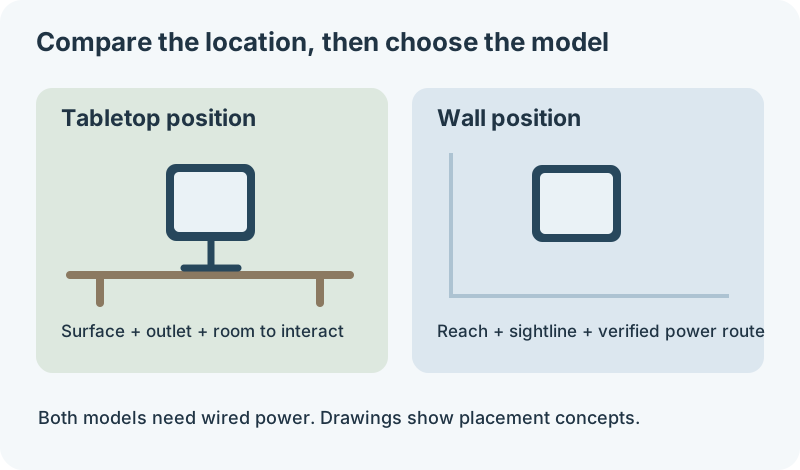
Read the diagram
- Tabletop: check the surface, outlet, viewing angle and room to interact.
- Wall: check reach, sightline, model compatible support and the full power route.
- Both routes: wired power is required, and a good looking position is not enough.
Map each room to an interaction, not just an appearance
A display’s most convenient position depends on whether people glance, touch or spend time in front of it. Glancing at a clock takes little commitment. Reading a recipe or making a call requires a useful viewing position for longer.
Kitchen and dining area
For a kitchen location, mark the space used for preparation, appliances and storage before placing the screen. Check the proposed position during the busiest meal routine. A device that fits on an empty counter can still obstruct normal work.
A tabletop position can bring the screen closer to the person cooking. A wall position can free the surface but may require turning away from the work area. Compare those movements with the actual task, including reaching to stop a timer.
Keep the location away from direct splashes, heat and steam, and follow the product’s installation instructions. A room name does not establish environmental suitability. Check the exact position rather than assuming every kitchen counter is equivalent.
Hallway or entrance
A hallway wall position can suit brief controls on arrival or departure. Check it while carrying groceries or helping a child, rather than only while standing still. The screen should not make a frequently used passage awkward.
If you expect to make long calls there, consider whether another location would be more comfortable. A central control point and a comfortable communication point can be different places. Do not make the wall position permanent until the main task is clear.
Bedroom or home office
For a bedside screen, check the sightline from the bed and the power cable’s route. The listed display brightness range is a specification, not our measurement of sleep comfort. Decide whether a screen at that position suits the people sharing the room.
In an office, consider what the camera can see during a call and what visitors can see on the display. A tabletop position can be easier to relocate when the desk arrangement changes. A fixed wall position needs more deliberate framing.
Choose a usable height without inventing one universal measurement
There is no single mounting height that serves every household. Compare the reach of the intended users and the angle from which they read the screen. Include seated users if that reflects normal use.
Make a paper outline and place it at the proposed position. Ask each user to reach the corners and describe whether they would need to lean or stretch. This simple location trial does not replace testing the actual touchscreen, but it can expose an unsuitable position early.
Voice interaction may reduce some touching, but do not assume it replaces every task. Check which controls and accessibility features matter to the intended person. Use the feature requirements guide when a voice task depends on personal context.
Accessibility belongs in the location decision
The technical sheet lists features such as VoiceOver, Zoom and Voice Control. These are documented capabilities, rather than evidence that a particular installation works for every user. Match the relevant feature to the person’s task before committing to a fixed location.
For example, someone who reads from a seated position may benefit from a different sightline than someone who mainly gives spoken commands. A household should consider both rather than selecting height for the installer alone. A tabletop trial can be useful when reach and viewing needs are still uncertain.
Trace the power route before committing to a model
Both physical models require wired power. A tabletop device is easier to move between suitable surfaces, but it still needs an appropriate powered location. Treat a move as a new placement check rather than a cordless use case.
For USB-C wall power, measure the usable path to the intended outlet. Include corners, the adapter position and the proposed cable management. A straight distance on a floor plan can underestimate the real path.
For a wired route, check the exact mount requirements with the installer before making holes. A visible wall location can hide an inconvenient infrastructure problem. Record the exact model, power route, wall condition and scope of work before arranging installation.
Moving home and changing routines affect the value of each model
If you rent or expect to move, include the effort of removing a wall installation and making the location good again. Confirm permission for the actual work with the property owner. Avoid assuming that every wall route is equally reversible.
A tabletop setup can be easier to take to another room, but the new location must still fit the household task. A wall setup can remain the better choice when a surface is unavailable and the position is established. Compare the benefit over the period you expect to use that location.
The Apple HomeView buying guide helps decide whether a dedicated screen earns its place at all. Settle that question before paying for a permanent installation.
A room test before ordering
- Identify the main task and the people who will perform it.
- Mark the proposed screen position on the surface or wall.
- Check the viewing angle from the real working or standing position.
- Trace the complete power route, including the outlet or installation work.
- Check whether the location remains usable when the room is busy.
- Price the complete setup and confirm the exact accessory model.
Repeat the test for the other physical model. It often reveals a practical advantage that a product photograph cannot show. Keep the setup you can explain in terms of daily use.
The HomeView tabletop vs wall mounted choice is ultimately a placement and infrastructure decision. Choose tabletop for a suitable flexible surface. Choose a documented wall route when a fixed location genuinely serves the household better.